Introduction
It starts with a simple idea: a developer builds a generative AI assistant on an AI workstation to help colleagues find answers buried in technical documents. The results are impressive. The team embraces it. Word spreads, more colleagues want access, and soon another department wants to use the assistant with its own data.
What began as a promising experiment is now becoming something much bigger.
But there’s a catch: an AI application that works brilliantly for one developer may not be ready for an entire organisation.
As adoption grows, new questions emerge. How do multiple teams share GPU resources without competing for capacity? How can each department access the right information without exposing sensitive data? How do you maintain performance, monitor usage and keep the application reliable when people begin depending on it for their daily work?
These are no longer just AI development challenges. They are infrastructure and operational challenges.
This is where the concept of an AI factory becomes important.
Rather than treating every AI application as an isolated experiment, an AI factory provides a structured way to develop, deploy and operate AI at scale. The journey doesn’t require abandoning the tools that made the first experiment successful. It means evolving the infrastructure as the demands grow.
AI workstations remain valuable for experimentation, prototyping and development. Shared GPU servers extend compute capacity across teams. Production inference infrastructure helps deliver predictable performance, while monitoring and operational controls provide visibility into how applications are running. As the number of AI workloads increases, AI factory infrastructure brings these capabilities together to make resources, data and operations easier to manage.
The real shift is from making AI work to making AI work reliably for everyone.
And that shift is what turns a successful AI experiment into an organisational capability.
What Changes When an AI Experiment Becomes a Shared Service?
1. An AI workstation makes it easier to test an idea
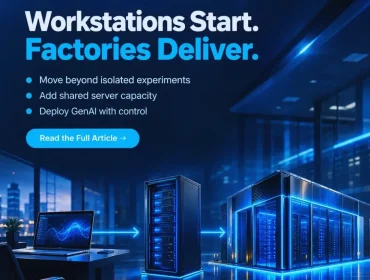
At the beginning, the developer needs freedom to experiment. An AI workstation can provide direct access to compute for testing prompts, evaluating models, developing early RAG applications and fine-tuning models that fit its capabilities.
The priority is speed of iteration: try an approach, inspect the result and make improvements. There may be little reason to set up central scheduling or a production environment while the use case is still being validated.
But a successful demonstration answers only one question: Can this approach work? It does not yet show how the application will perform when several people use it, how access to company data will be controlled or who will maintain it once the original developer moves to another project.
2. More users make shared compute and repeatability important
As colleagues begin using the assistant, separate workstation setups can become difficult to manage. People may run different software versions, maintain duplicate models or wait for the same limited compute resources.
A shared GPU server can provide centrally managed accelerator capacity for teams that need larger models, more users or longer-running jobs. Just as important, the development environment must be repeatable. Teams should be able to move the application, its dependencies and its data connections to a managed system without rebuilding the project from scratch.
This is not a rule that every prototype must leave the workstation. The decision depends on actual demand and the need for shared access.
3. Production introduces responsibilities the prototype did not have
When the assistant becomes part of a business process, users expect it to be there when they need it. The organisation needs to know how many requests it can serve, how it handles failures and who is allowed to access the information it uses.
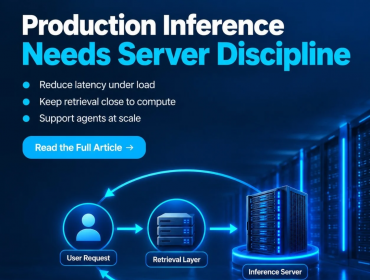
LLM inference must support live requests with acceptable response times. RAG applications need reliable retrieval from authorised enterprise data. AI agents may interact with several services, making monitoring and permissions even more important.
Production therefore calls for capacity planning, security, service monitoring and a way to keep development jobs from disrupting the application. The challenge is as much about operating AI reliably as it is about acquiring more compute.
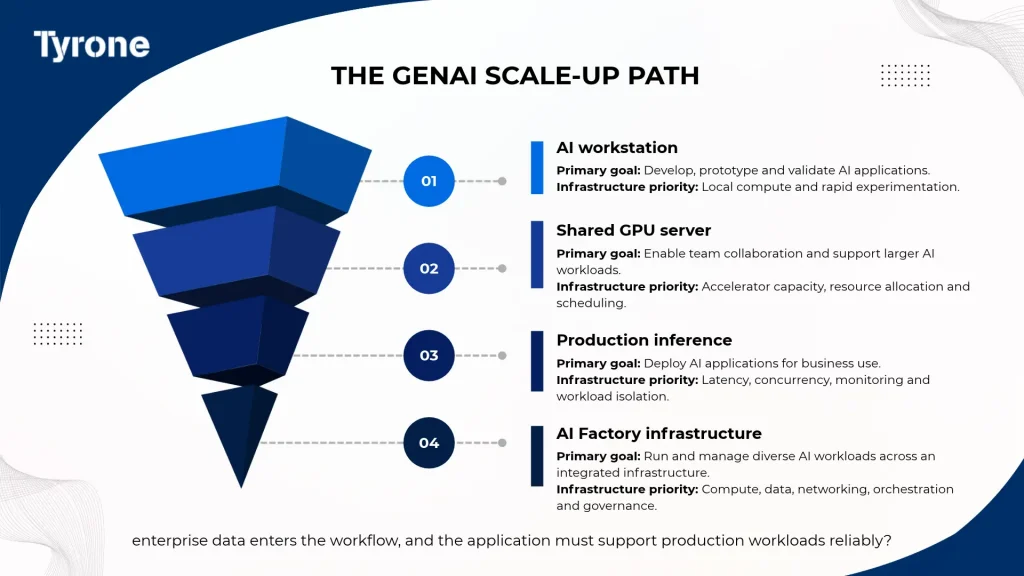
The original scale-up framework shows how the priorities change as AI adoption grows.
| Scale Stage | Primary Goal | Infrastructure Priority |
| AI workstation | Prototype and validate quickly | Local developer access, fast iteration |
| Shared GPU server | Serve a team and larger jobs | GPU density, shared access, scheduling |
| Production inference layer | Run business-facing AI reliably | Latency, concurrency, isolation and uptime |
| AI factory infrastructure | Support many AI services at scale | Compute + data + networking + orchestration + governance |
| Explore the Tyrone Camarero Series for shared GPU compute and enterprise AI infrastructure: https://tyronesystems.com/servers/Latest_Generation.php |
How to Scale AI Without Rebuilding It at Every Stage
Make a successful experiment easy to reproduce
Before adding new users, document how the prototype works: which model and software versions it uses, where it gets data and what hardware resources it needs. Containers and standard deployment processes can help teams repeat that environment across different machines.
Some details will still need adjustment, especially GPU drivers, permissions and data connections. The purpose of standardisation is not to make every environment identical. It is to reduce surprises when moving from an individual workstation to shared infrastructure.
Introduce shared GPU resources when there is a clear need
Shared compute becomes useful when teams compete for local GPU capacity, projects need more memory or accelerator resources, or central scheduling can improve utilisation. It also gives IT teams greater visibility into which applications need capacity and when.
Infrastructure teams should decide what to centralise based on workload size, team access and operational requirements. Workstations can continue supporting early development while shared GPU servers handle jobs that benefit from a common resource pool.
Give live applications different rules from experiments
A training job can often be rescheduled. A production assistant used by employees throughout the day may not have that flexibility. When both use the same infrastructure estate, live services need appropriate capacity, scheduling priorities and isolation.
Monitoring should cover response times, utilisation, errors and availability. RAG deployments need access controls around enterprise information, while agent workflows need permissions for the tools they use. These safeguards help the organisation operate the application as a service, rather than as a demonstration that happens to be available.
Connect the pieces into an AI factory foundation
As more teams deploy AI, repeatedly setting up compute, storage, data access and operational controls can slow progress. AI factory infrastructure provides common ways to manage these requirements across applications.
That includes shared approaches to workload orchestration, monitoring, security, data connectivity and capacity planning. Individual teams can still develop new use cases, but they do not need to create a separate operating model for every project. The result is a more repeatable path from experimentation to production.
Where the Tyrone Camarero Series fits
The Tyrone Camarero Series gives organisations GPU-optimised server options for shared compute and enterprise AI workloads. Infrastructure teams can assess different levels of accelerator capacity, system memory, CPU resources, storage and expansion when deciding how to support growing demand.
Those servers can form part of the scale-up path, but the full AI factory also requires software, security, data access and operational processes. The aim is to choose compute that fits the application and integrate it into a platform teams can use consistently.
Conclusion: keep the speed of experimentation as AI grows
The workstation is where many useful AI ideas begin. The next step is not automatically a bigger server; it is understanding what changes when more people and business processes depend on the application.
A clear plan for repeatable environments, shared GPU resources, dependable production inference and common operational controls helps enterprises scale successful GenAI projects without starting over each time. That is how an experiment becomes part of a sustainable AI factory.
| Taking GenAI beyond individual workstation experiments? Talk to a Tyrone AI infrastructure specialist about shared GPU servers, production inference and AI factory planning. |
Frequently Asked Questions
When should an AI team consider moving beyond a workstation?
Consider shared GPU infrastructure when several users need coordinated access, workloads exceed local capacity or central scheduling and monitoring become important. Workstations can still support individual development and testing.
What is the difference between a GPU server and AI factory infrastructure?
A GPU server supplies accelerated computing capacity. AI factory infrastructure also includes data access, storage, networking, orchestration, security and operational controls for managing multiple AI workloads.
Can AI development and production run on the same infrastructure?
They can share an infrastructure estate, but production services should have appropriate capacity, workload isolation and scheduling priorities so long-running development jobs do not disrupt live applications.
What should enterprises plan before scaling GenAI?
Start with the workload, its users, model size, data access and performance needs. Then plan repeatable development environments, shared resources, security, monitoring and how capacity will grow with demand.